Homoglyph and IDN lookalike domains explained
A Cyrillic letter can make paypal.com look real while DNS resolves a different name. Here is how IDN and homoglyph lookalikes work, with a 28 October 2026 LookalikeDomain.com scan.
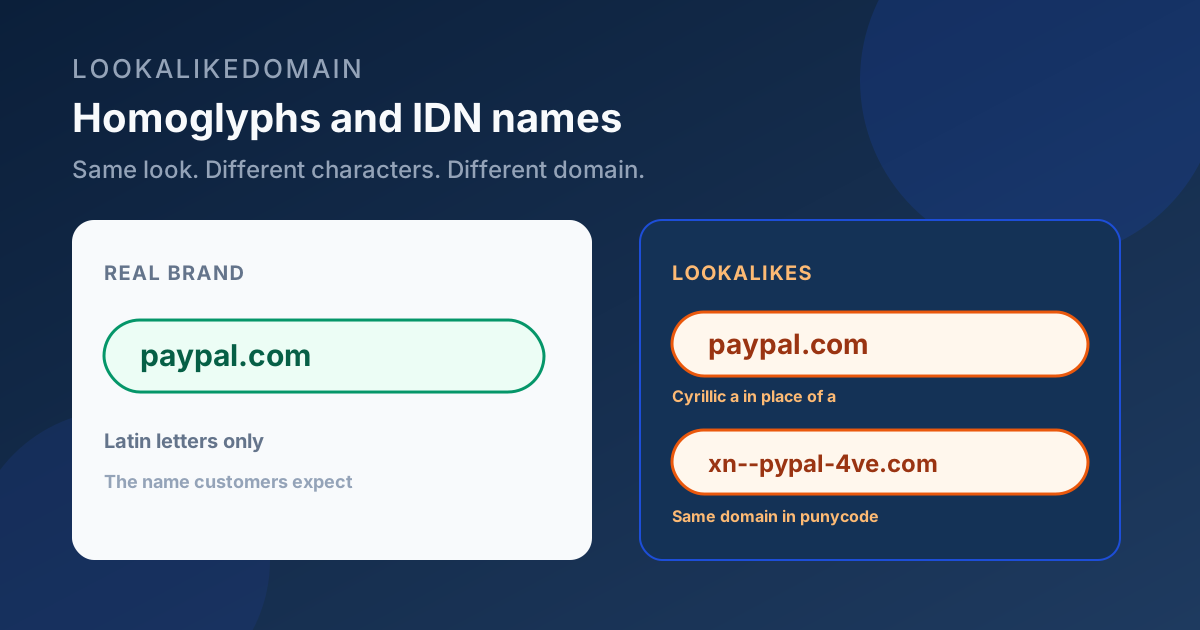
Most lookalike domains swap a letter for a digit, drop a character, or glue your brand to login or support. Homoglyph and IDN names do something quieter: they keep the shape of the word and change the character underneath.
Internationalized domain names (IDNs) let a label use characters outside basic Latin. DNS still needs ASCII, so the registry stores a punycode form that starts with xn--. A browser may show the Unicode spelling. A careless reader sees a familiar brand. The wire sees a different domain.
Homoglyphs are the lookalike pairs. Latin a and Cyrillic а (U+0430) are the classic example. Latin l and the digit 1 are the everyday ASCII version of the same idea. LookalikeDomain treats both as first-class match reasons, not as footnotes.
What a real Cyrillic PayPal cousin looks like
On 28 October 2026 our LookalikeDomain.com scan of paypal.com found 1,853 registered lookalikes. Inside that list sat xn--pypal-4ve.com. Decoded, that label is pаypal.com with a Cyrillic а in place of the first Latin a. The scan marked it high risk for that Unicode swap, and DNS was already active.
That is not a theoretical demo from 2005. It is a live registration the same scanner returns for any brand you check. Accented Latin swaps showed up too: xn--paypl-uqa.com (paypàl.com) and xn--pypal-rqa.com (pàypal.com) both resolved. Those score a bit lower than a mixed-script Cyrillic swap, because some brands legitimately own accented spellings, but they still belong on the list.
ASCII swaps are the same problem in a louder font
Digit and letter swaps are easier to spot in a monospace font and just as useful in a phishing mail. On the same PayPal scan, paypa1.com replaces l with 1 and can send mail. p4ypal.net replaces a with 4, can send mail, and answers on HTTPS. paypai.net replaces l with i.
Apple’s list on the same day had the same pattern at scale: 2,499 lookalikes of apple.com, including app1e.com, app1e.net, 4pple.com, and appl3.com, many of them already able to send mail. Stripe’s list included strlpe.com (i→l) with a live page that redirected to stripe.com, and 5tripe.com (s→5) with mail configured. Chase had ch4se.net and cha5e.com parked with mail ready.
If you only hunt for xn-- names, you miss the cousins that never leave ASCII. If you only hunt for digit typos, you miss the Unicode ones. The useful check is both.
How to read an IDN hit in the results
When a match is punycode, the important fields are the ASCII domain (what you paste into WHOIS, a report, or a blocklist), the Unicode display form when the UI shows it, and the reason line that names the script and the swapped character. Links and reports should stay on the xn-- form so nobody “fixes” the spelling back to the brand by accident.
A padlock does not settle the question. Certificates are cheap. Mail DNS and a page that already speaks as the brand are the stronger signals. On PayPal, brand-plus-keyword cousins such as paypal-support.com, paypal-secure.com, and secure-paypal.com also showed mail configured. Those are not Unicode tricks, and they sit next to the IDN hits in the same priority queue.
What to do if you see one on your brand
- Copy the punycode domain exactly. Do not retype the Unicode spelling into a registrar search and assume you got the same name.
- Check whether it can send mail and whether a website answers. Prefer those when you report abuse.
- Note the reason string. “Cyrillic а in place of a” is evidence a human can verify; a vague “looks similar” is not.
- Keep watching. Homoglyph inventory changes when someone registers the next swap, not when your trademark calendar ticks.
A free lookalike check surfaces Unicode and ASCII swaps together. For the PayPal and Apple numbers above, the research scan listed every match and probed mail and pages the same way the product does for monitored brands.